| Pioneer | Visible |
| Expert | Visible |
| Simplified | Visible |
| Management | Hidden |
| Business | Hidden |
The Threat Type List is the list of all Threat Types and related Mitigations defined in the Threat Model. It is available from the View ribbon.
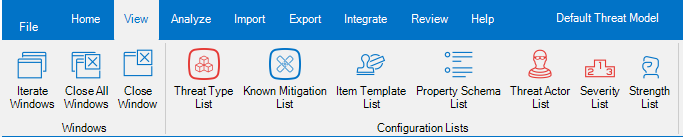
It can be used to assign and review Standard Mitigations to Threat Types.
The Threat Type List shows two levels:
- The first level is represented by the Threat Types.
- The second level is represented by the Standard Mitigations associated to each Threat Type.
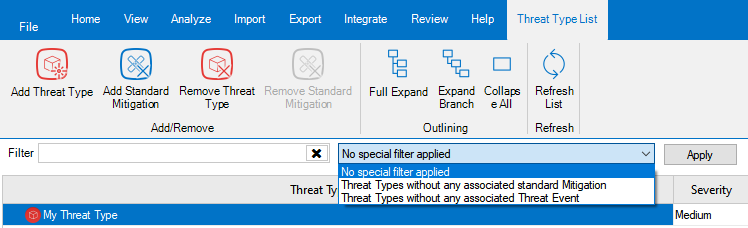
The Threat Type List ribbon provides the possibility to:
- Add a new Threat Type to the list: when you click the aptly named button, the Threat Type Creation dialog is shown. Simply fill in the name, description and severity of the new Threat Type, and you are done.
- Add a new Standard Mitigation to the selected Threat Type: when you click the aptly named button, the Standard Mitigation association dialog is shown. See below for details.
- Remove one or more of the Threat Types selected in the list. Please note that this will fail, if there are associated Threat Events.
- Remove one or more of the Standard Mitigations selected in the list. Please note that this will succeed, even if the Mitigation is already associated to Threat Events.
- Full Expand the tree.
- Expand Branch, which expands the current node and all sub-nodes.
- Collapse All nodes to the Threat Types.
- Refresh the list, using the aptly named button.
Right below the ribbon, there are the filters: you can both filter the Threat Events containing some text, and also by using some Special Filter, which allows to identify Threat Events which are of a particular interest:
- Threat Types without any associated Standard Mitigation.
- Threat Types without any associated Threat Event.
All those filters are pretty self-explanatory.
The Standard Mitigation association dialog
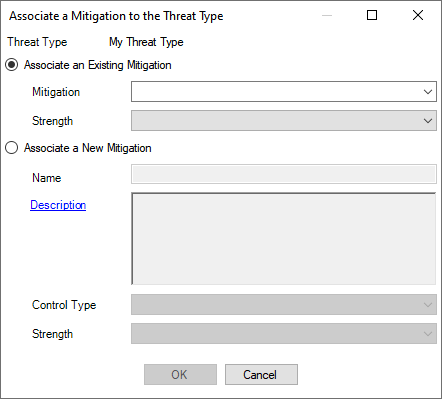
The Standard Mitigation association dialog allows to select an Existing Mitigation to be associated to a Threat Type.
You can also create a new Mitigation, specifying its Name, optionally a Description, its Control Type and the standard Strength of the Mitigation for the Threat Type.
The Strength can assume one of those values:
- Maximum, which indicates a mitigation that could be considered strong enough to make the residual risk for the Threat Type negligible, even when it is not combined with other mitigations.
Bottom line: Maximum Strength should be used sparingly, for those situations that are clearly addressed by the Mitigation, like Backup for a Threat like “Data can be destroyed irrevocably due to lack of a tried backup strategy”. - Strong should be used for Mitigations that are almost but not quite enough for making the residual risk for the Threat Type negligible.
- Average, which is to be used for Mitigations that have a significant impact on the Threat, but not so much as the Strong ones.
- Low should be used for Mitigation which have some effect, even if minor.
- Negligible is thought for being used for Mitigations that have an extremely limited effect on the associated Threat Type.
Bottom line: it is typically used for Mitigations that are thought to have an effect, to indicate that in reality that effect is minimal. Avoiding to associate the Mitigation would not do, because it would not be possible to discriminate between this situation and one where you would not have included the Mitigation because you haven’t thought about it.
The Mitigation Status can assume the following values:
- Existing, which indicates a mitigation that already exist, when the Threat Model is performed.
- Proposed, used to indicates new Mitigations you are proposing, as a Threat Modeler.
- Implemented, which is used for existing Mitigations which have been introduced as a consequence of your Threat Model.
Bottom line: if you are doing the Threat Model as an iterative effort (for example, as part of Scrum Sprints), then you may recommend a Mitigation in Sprint N as Proposed; then it could be implemented during Spring N+1, and you could change the status to Implemented as part of your refresh done in Sprint N+2. - Approved, to indicate a Mitigation that is known (for example it is tracked in the Backlog), but it has not been planned, yet.
- Planned is to be used for Mitigations that are known and have been planned for implementation.
Bottom line: Planned Mitigations require to specify an availability date.
 Threats Manager Studio