| Pioneer | Visible |
| Expert | Visible |
| Simplified | Hidden |
| Management | Hidden |
| Business | Hidden |
Threat Types and Events have associated a Severity.
Severity can typically be set to one of the following values:
- Critical, which should be used for extremely important issues, impacting the main functionality and very sensitive data, and for which there is no mitigation in place.
Critical issues should be considered reason enough for stopping the deployment of the solution in Production.
Bottom line: use them sparingly. - High Severity Threats are important issues, impacting the main functionality and sensitive data, for which there is a partially effective mitigation.
If you have one or more of them, you should consider forcing the adoption of some additional mitigation before allowing the deployment of the solution.
Bottom line: they are less severe than Critical ones, but still very important and you need to take them very seriously. - Medium Severity would be used for Threats impacting main functionalities and sensitive data, when there is some mitigation in place, or for secondary functionalities and not particularly sensitive data, when there is no mitigation.
While one or two of those may not be considered as blocking for going in Production, many of them would represent a risk big enough to warrant preventing the solution to be deployed in Production.
Bottom line: do not neglect attention to Medium Severity issues. - Low Severity issues are typically associated to secondary functionalities and non-sensitive data, or when you already have mitigations in place.
Typically, Low Severity issues are not considered as blocking.
Bottom line: you cannot zero the risk. You have to accept some, and Low Severity issues are the best candidates for acceptance. - Info level issues do not represent a risk at all: they are there to represent situations where the risk could be considered negligible.
Bottom line: they can be safely neglected.
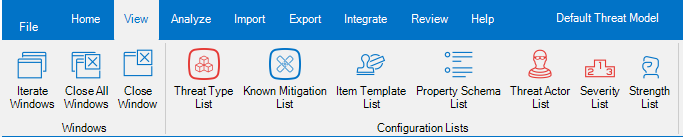
Threats Manager Studio (TMS) provides a tool to edit the Severities, called Severity List. This tool is available from the View ribbon.
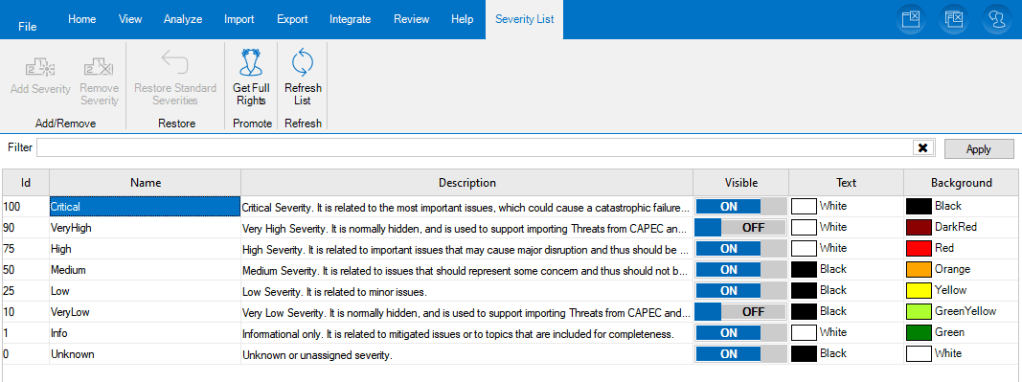
If you open the Severity List, you can see the list of all Severities defined in the Threat Model.
The most common use of the Severity List is to change the description of the various Severities, to better reflect the definitions in use in your Organization. It is also possible to change the visibility of the provided levels, or to change the color of the Text and Background.
ATTENTION
Severities are widely used in TMS, and some of the implemented logic relies on the ID. As a consequence, changing the ID, adding or removing Severities may damage the integrity of the Threat Model. For this reason, TMS does not show the Severity List when the Execution Level is Simplified or lower, and does not allow to perform those activities without elevation. If you want to make one of those changes at risk, you need to accept the risk of damaging the Threat Model, therefore you need to click on Get Full Rights button in the Severity List ribbon and explicitly accept the risk.
Why the ID is important
The ID is used by TMS to calculate the risk of Threat Types and Events in a qualitative way. Some functions like the Roadmap use it to calculate the risk of the Threat Model at a specific moment.
For example, it is possible to calculate the current Severity of the Threat Model as the sum of the IDs assigned to the Severities for each Threat Event. Therefore, if we have three Threat Events, “A” with Severity Medium, “B” with Severity Info and “C” with Severity “Low”, the total Risk for the Threat Model will be 76.
This represents a Qualitative approach even if it expresses the Severity as a number, because the original evaluations are qualitative. As a result, it does not allow to compare total Severities of different Threat Models, but it can be used to visualize the impact of the Mitigations defined within the Roadmap.
Note
One of the most important characteristics of TMS is to be extensible. This allows to adopt Extension libraries to add support for some Quantitative approach like FAIR.
 Threats Manager Studio