| Pioneer | Visible |
| Expert | Visible |
| Simplified | Visible |
| Management | Hidden |
| Business | Hidden |
The Data Store List is the list of all Data Stores defined in the Threat Model. It is available from the Home ribbon.

It can be used to work on Data Stores in a tabular form, which may be more effective for some use cases, for example when massive editing is required.
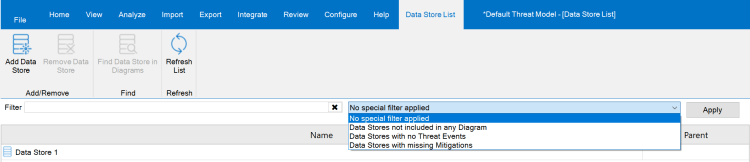
The Data Store List ribbon provides the possibility to:
- Add a new Data Stores: when you click the aptly named button, a new instance is created.
- Remove one or more of the Data Stores selected in the list.
- Open a diagram where the currently selected Data Store is present, using the Find Data Store in Diagrams action. If more Data Stores are selected, only the one shown by the Item Editor will be considered.
- Refresh the list, using the aptly named button.
Right below the ribbon, there are the filters: you can both filter the Data Stores containing some text, and also by using some Special Filter, which allows to identify Data Stores which are of a particular interest:
- Data Stores not included in any Diagram.
- Data Stores with no Threat Events.
- Data Stores with Missing Mitigations.
All those filters are pretty self-explanatory.
Tips & Tricks
When you delete an object from a diagram, if you do not use the Remove from Model action from the context menu of the object, it would not be removed from the Threat Model but only from the diagram. The Data Store List allows to see all Data Stores defined in the Threat Model, including those which have been removed from diagrams.
To further identify them, you can use the Special Filter named Data Stores not included in any Diagram.
 Threats Manager Studio