Threat Models are represented in Threats Manager Studio (TMS) through diagrams derived from Data Flow Diagrams (DFDs).
Threats Manager Studio’s diagrams use stencils to represent the Entities, which describe the various parts internal or external to the analyzed Solution. The main types of entities, are:

External Interactors
Represent external objects, like Users or third-party Services, that interact in any way with the Solution.
Tips & Tricks
Being external to the Solution, the External Interactors are the least trusted components of them all. This is true not only for Users and third-party Services, but also for Services provided by your Organization.

Processes
Represent parts of the Solution. They may include functionalities to store data, but the focus is on task execution, not on data.
Tips & Tricks
Processes represent the main component of the solution. Virtually all Threat Models must have at least one of them.

Data Stores
Represent parts of the Solution dedicated to storing data.
They have no logic for processing data or to do any other task.
Tips & Tricks
Data Stores cannot have any logic. As such, they cannot originate requests to other components. A consequence of this rule is that flows starting from a Data Store and going to another Data Store must be considered a mistake.
TMS allows to choose different icons for the Entities: for this reason, the icons shown above must be considered as indicative.
In TMS, Entities can be created in the following ways:
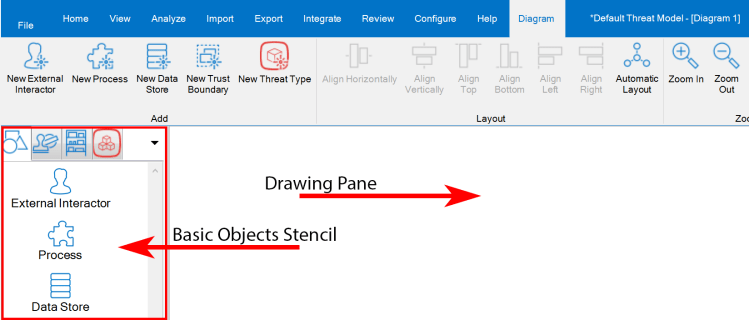
- In diagrams, you can click the New External Interactor, New Process or New Data Store button from the Diagram ribbon.
- In diagrams, you can drag & drop the icon of the selected Entity from the Basic Objects stencil to the Drawing Pane.
- In the Drawing Pane, you can use the context menu, by clicking on an empty space with the right button of the mouse. You can then select actions like Create an External Interactor, Create a Process, Create a Data Store, or Create a Trust Boundary.
- In the Home ribbon, open the External Interactor List, the Process List, or the Data Store List and then click respectively the Add External Interactor, Add Process and Add Data Store button.

 Threats Manager Studio